This diagram explains a classic 3-tier web architecture. It is a common pattern for building solid, scalable applications. This version runs on AWS and is automated with CloudFormation.
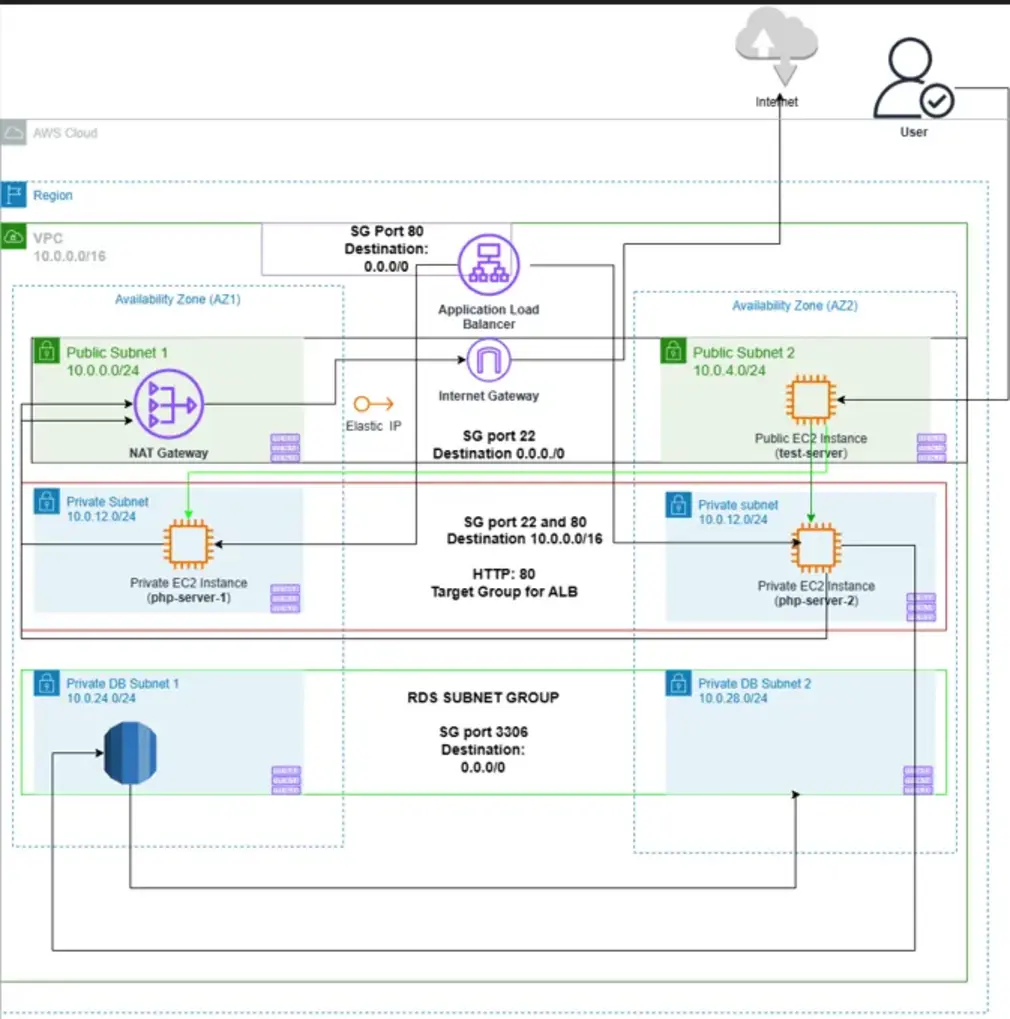
Figure 1: A standard 3-tier architecture on AWS. Click the image to view full size.
Architectural Overview
The 3-tier architecture splits the application into three separate layers:
- Presentation Layer (Web Tier): The layer users interact with. It has a load balancer that spreads traffic and web servers that serve the user interface. This layer lives in a public subnet, so the internet can reach it.
- Application Layer (App Tier): This layer holds the business logic. It runs on application servers (like EC2 instances) in a private subnet. The internet cannot reach it directly, which improves security.
- Data Layer (Database Tier): This layer stores the application's data. It has a database (like Amazon RDS) in its own private subnet, making it the most protected part of the architecture.
Why This Architecture?
This design is a standard for enterprise applications for several reasons:
- Security: The app and database layers sit in private subnets, so the internet cannot reach them directly. This greatly reduces the attack surface.
- Scalability: Each layer scales on its own. If the app logic becomes a bottleneck, you can add more app servers without touching the other layers.
- Maintainability: Keeping the layers separate makes the application easier to build, update, and maintain. Different teams can work on different layers at the same time.
- Automation: AWS CloudFormation defines the infrastructure as code. Deployments become fast, reliable, and repeatable, and manual configuration errors go away.